思科交换机的配置模式基本配置命令
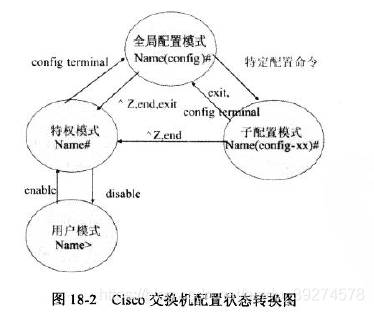
Switch>enable
Switch#
Switch#configure terminal
Switch(config)#
Switch(config)#hostname cisco-sw1
cisco-sw1(config)#enable password cisco
ps:password表示密码为明文
cisco-sw1(config)#enable secret ciscoswitch
ps:secret表示密码用的密文
cisco-sw1(config)#vlan 2
cisco-sw1(config-vlan)#name test
cisco-sw1(config-vlan)#exit
cisco-sw1(config)#interface fastEthernet 0/1
cisco-sw1(config-if)#switchport mode access
cisco-sw1(config-if)#switchport access vlan 2
switch> enable
switch#configure terminal
switch(conf)# interface fastehernet 0/1
switch(conf-if)#
switch> enable
switch# show version 察看系统中的所有版本信息
switch#show vlan id 1 查看交换机有关vlan配置信息
switch#show running-configure 查看交换机当前起作用的配置信息
switch#show interface fastethernet 0/1 察看交换机1 接口具体配置和统计信息
switch#show mac-address-table 查看mac地址转发表
switch> enable
switch# erase startup-configure
switch# reload
switch>en
switch#configure terminal
swich(conf)#enable password cisco 以cisco 为特权模式密码
swich(conf)#interface vlan 1 以vlan 1端口作为远程登录的接口,其他端口亦可
swich(conf-if)#ip address 192.168.1.1 255.255.255.0
swich(conf-if)#no shut
swich(conf-if)#exit
swich(conf)line vty 0 4 设置0-4 个用户可以telnet 远程登陆
swich(conf-line)#password 123456
swich(conf-line)#login
Switch#conf t
Enter configuration commands, one per line. End with CNTL/Z.
Switch(config)#hostname cisco-sw1 交换机重新命名
cisco-sw1(config)#ip domain-name cisco.com 配置域名
cisco-sw1(config)#line vty 0 4
cisco-sw1(config-line)#transport input ssh 登录方式为SSH
cisco-sw1(config-line)#exit
cisco-sw1(config)#crypto key generate rsa 配置秘钥
The name for the keys will be: cisco-sw1.cisco.com
Choose the size of the key modulus in the range of 360 to 2048 for your
General Purpose Keys. Choosing a key modulus greater than 512 may take
a few minutes.
How many bits in the modulus [512]: 1024 思科推荐使用1024
% Generating 1024 bit RSA keys, keys will be non-exportable...[OK]